Skocz do zawartości
View in the app

A better way to browse. Learn more.

Forum PSX Extreme

A full-screen app on your home screen with push notifications, badges and more.

To install this app on iOS and iPadOS
  1. Tap the Share icon in Safari
  2. Scroll the menu and tap Add to Home Screen.
  3. Tap Add in the top-right corner.
To install this app on Android
  1. Tap the 3-dot menu (⋮) in the top-right corner of the browser.
  2. Tap Add to Home screen or Install app.
  3. Confirm by tapping Install.

Ryuk

Patroni
  • Dołączył

Ryuk

Image

Ryuk

image.thumb.png.c62dadaf5824d0c3724991fd62abb4ea.png

Ryuk

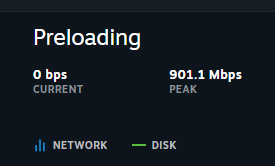
Darmowa platforma i taka predkosc :banderas:image.png.1989be6316054e3c99c563c3d446b924.png

Ryuk


image.png

Ryuk


Ryuk

RIP  Darth Vader i Mufasa

Ryuk

To byly czasy

Ryuk

temp_image_BF3854D5-5214-4F43-A817-05383

Ryuk

vea8g21t64kd1.gif


Ryuk

image.thumb.png.2835e83c33ac510f1c31b4c5607f4b7f.png

Account

Navigation

Szukaj

Szukaj

Configure browser push notifications

Chrome (Android)
  1. Tap the lock icon next to the address bar.
  2. Tap Permissions → Notifications.
  3. Adjust your preference.
Chrome (Desktop)
  1. Click the padlock icon in the address bar.
  2. Select Site settings.
  3. Find Notifications and adjust your preference.