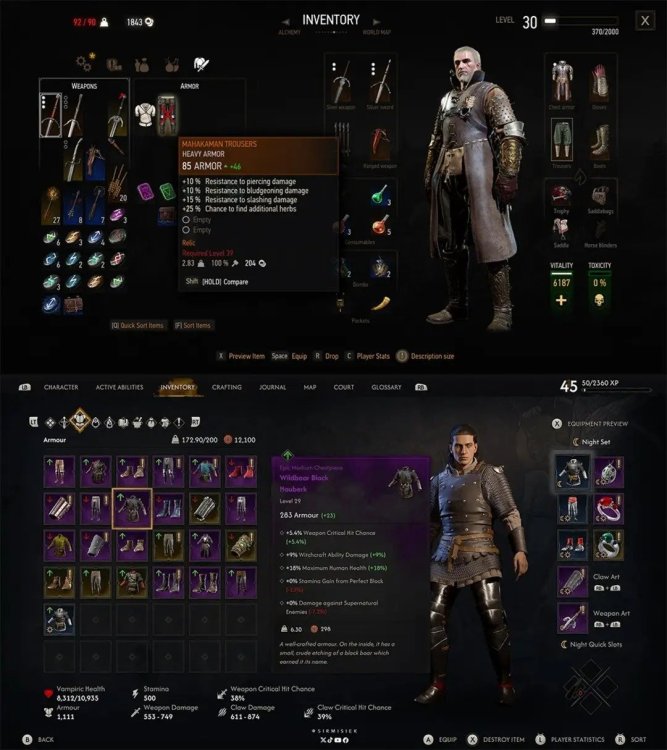
KrYcHu_89 16 sierpnia16 sie rafanus2 16 sierpnia16 sie Gdzie wady KrYcHu_89 16 sierpnia16 sie No własnie nigdzie. Chewie 16 sierpnia16 sie Menu z wieśka lepsze, nie lubię jak są te kwadraty i każdy przedmiot ma taką samą wielkość, często to robią w nowych slopach ogqozo 16 sierpnia16 sie O wow, zachodni cRPG wygląda jak każdy zachodni cRPG ostatnich 10-15 lat.
Chewie 16 sierpnia16 sie Menu z wieśka lepsze, nie lubię jak są te kwadraty i każdy przedmiot ma taką samą wielkość, często to robią w nowych slopach









rafanus2
Gdzie wady
KrYcHu_89
No własnie nigdzie.
Chewie
Menu z wieśka lepsze, nie lubię jak są te kwadraty i każdy przedmiot ma taką samą wielkość, często to robią w nowych slopach
ogqozo
O wow, zachodni cRPG wygląda jak każdy zachodni cRPG ostatnich 10-15 lat.