








Figuś
Senior Member
-
Dołączył
Treść opublikowana przez Figuś
-
Ty w ogóle miałeś PS4 i te słuchawki? Zarówno Gold jak i Platinum obsługiwały VSS, a do tego była jeszcze DODATKOWA aplikacja z predefiniowanymi setupami dla VSS pod konkretne gry, ale nic nie stało na przeszkodzie je po prostu wgrać i używać normalnie. To był zwykły equalizer a nie jakieś cuda na kiji. A profil wygrywało się do słuchawek nie do konsoli właśnie z tej aplikacji. Tak miałem 2.0 i Goldy które mam na sprzedaż. Platinum miały jeszcze profile 3d audio które było dostępne w kilku tytułach i wcześniejsze słuchawki tego nie obsługiwały
-
-
Platinumy, niestety mało gier to obsługiwało bo developer musiał przygotować dedykowany profil do danego tytułu który się wgrywało przez apkę do konsoli.
-
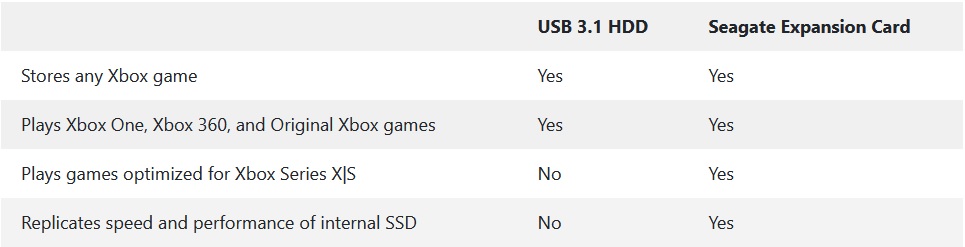
Myślę że znacznie więcej osób niż możesz sobie wyobrazić. Wystarczy wyjść poza forumkową bańkę i inaczej spojrzeć na rynek. Albo zapytać @Dave Czezky jak to jest z PL wersjamiRaczej dobrze skoro Sony w zeszłym roku podpisało z nimi umowę na wykorzystywanie ich chmury https://www.theverge.com/2019/5/20/18632374/microsoft-sony-cloud-gaming-partnership-amazon-googleA co, działanie we wstecznej też blokuje?XH90 HDR (High Dynamic Range) / Formaty HDR tak / Dolby Vision, HDR10, HLG (Hybrid Log-Gamma)Tego już nie wiem, ale TV Sony obsługują DV to konsola tez powinna. O audio już kiedyś @Hendrix pisał tylko nie pamiętam czy w tym temacie, czy w temacie o następnej generacji w graczpospolitej.Było już to pisane że w Dolby Atmos nie idą bo trzeba za licencje płacić. Od tego jest ten ich Thempest3DDzisiaj odbieram swoją kopie z paczkomatu, ale i tak dopiero na PS5 po CP2077 wleci na ruszt. Może już połatają do tej poryWięcej z emerytur które roznosi będzie babciom zabierał z tekstem "wie babcia, że idzie nowa generacja?"Nowy store dostępny od dzisiaj dla wszystkich https://news.xbox.com/en-us/2020/09/24/new-microsoft-store-on-xbox/?ocid=Evergreen_soc_omc_xbo_tw_Photo_lrn_9.24.5Przyda się taki temat Na tą chwilę podstawowym rozszerzeniem pamięci pędzie customowy Seagate - 1TB Game Drive for Xbox Series X and Series S External Custom PCI Express Gen4 x2 (NVMe) Solid State Drive, który nie będzie tani - cena w okolicach 220 dolanów. Będzie on wymagany do prawidłowego działania gier nextgenowych Ale spokojnie, do odpalania gier z poprzednich generacji wystarczy zwykły dysk zewnętrzny na USB 3.1 (nie wiem czemu w tekście nie piszą nic o 3.0), będzie można na nim przechowywać next genowe tytuły, ale żeby je odpalić będziesz musiał/a przenieść je na wewnętrzny dysk SSD https://news.xbox.com/en-us/2020/09/24/xbox-series-x-and-xbox-series-s-custom-storage-solution-primer/
 edit. i kolejny sklepik jutro rusza z preorderami ponownieJuż gdzie nie gdzie będą ruszać ponownie preordery. Dzisiaj dostałem taką odpowiedź na SC @balon Media expert całą kwotę pobierał, empik zaliczka i jeszcze gdzieś brali kasęDramatyzujecie, z tym info od znajomych to najczęściej jest tak jak z tym zamykaniem wjazdów do W-wa czołgami w marcu. Konsole będą na paletach i zdążycie jeszcze się rozbić na pralce nie zbierając zakrętu





Account
Navigation
Szukaj
Configure browser push notifications
Chrome (Android)
- Tap the lock icon next to the address bar.
- Tap Permissions → Notifications.
- Adjust your preference.
Chrome (Desktop)
- Click the padlock icon in the address bar.
- Select Site settings.
- Find Notifications and adjust your preference.
Safari (iOS 16.4+)
- Ensure the site is installed via Add to Home Screen.
- Open Settings App → Notifications.
- Find your app name and adjust your preference.
Safari (macOS)
- Go to Safari → Preferences.
- Click the Websites tab.
- Select Notifications in the sidebar.
- Find this website and adjust your preference.
Edge (Android)
- Tap the lock icon next to the address bar.
- Tap Permissions.
- Find Notifications and adjust your preference.
Edge (Desktop)
- Click the padlock icon in the address bar.
- Click Permissions for this site.
- Find Notifications and adjust your preference.
Firefox (Android)
- Go to Settings → Site permissions.
- Tap Notifications.
- Find this site in the list and adjust your preference.
Firefox (Desktop)
- Open Firefox Settings.
- Search for Notifications.
- Find this site in the list and adjust your preference.