Shago
Senior Member
-
Dołączył
-
Ostatnia wizyta
Treść opublikowana przez Shago
-
W tej chwili w Polsce jest zarejeatrowanych 140k elektryków a ten chce by ładowarek było na kilka milionów już teraz. No dzban . Z PEWNOŚCIĄ te wszystkie 140k znajdzie się na tym samym koncercie co ty w tej samej chwili.
-
Ty naprawde zatrzymałeś się wiedzą o elektrykach w 2020 roku..
-
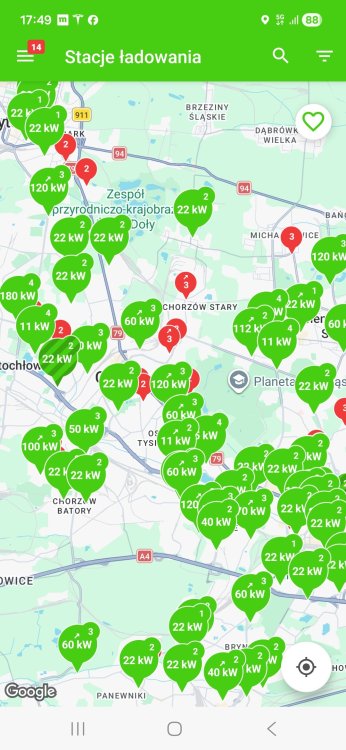
To tylko jedna z sieci oferująca ładowarki. Skończ się już więc kompromitować.
-
Bo jak wiadomo wszyscy tej nocy wracali z tego koncertu co Ty i mieli auto tyle godzin na parkingu
-
Ależ stereorypowy post, bardzo oderwany od realiów z prostej przyczyny: gdybym miał zostawić auto na jakimś parkingu na kilka godzin jak Ty zrobiłeś to w Katowicach jest pierdyliard ładowarek AC 11kW, gdzie zostawiam auto i później wracam do w pełni naładowanego. Tak, to serio tak proste, nie wymyślaj więc scenariuszy tylko pod tezę.
-
Bzdurą to jest pisanie, że hybryda dostarcza taki sam feeling jazdy jak pełnoprawny elektryk.
-
Ok, jak dobrze, że Ty zawsze masz pojęcie :). Chcesz to sobie jeździj hybrydami, nic mi do tego.
-
Właśnie przedstawiłeś najgorszy typ hybryd, gdzie często jest tak, że jak bateria nie jest naładowana to spalinówka traci moc. Jeszcze gorszy typ pojazdów niż plug-in. Poza tym w tych autach jest tak mizerna pojemnościowo bateria, że nijak to się ma do środka ciężkości w pełnoprawnym elektryku. Spoko, a teraz porównaj to cenowo do Tesli 3 LR :). O poziomie skomplikowania silnika względem elektryków to już w ogóle nie ma co dyskutować.
-
Pełny elektryk pozbawia mnie wszystkich wad spalinówki + znacznie upraszcza konstrukcję całego auta. Hybryda Plug-In to skomplikowanie konstrukcyjne + w dalszym ciągu silnik spalinowy + chyba zawsze mniejszy bagażnik względem normalnej wersji. Dziękuję, postoję.
-
Ale to nie jest kwestia wyłącznie przyspieszenia. Moment obrotowy w elektryku to jest coś pięknego, jest w pełnym zakresie: jak potrzebuję kogoś wyprzedzić to nie ważne ile jadę to zawsze mam pełną moc silnika. Nie ma czegoś takiego jak zmiana biegów, automat się nie dławi na chwilę gdy musi zrzucić bieg na gwałtowne przyspieszenie, nie ma żadnego szarpania. Do tego gaz w podłogę i silnik nie wyje bo nie ma co wyć. Oprócz tego takie niuanse jak niski środek ciężkości z racji baterii pod cały samochodem i wchodzenie w zakręty nie powoduje niemal żadnego przechylania. Jazda pod górkę? Żadnego problemu: gaz wciskam i auto przyspiesza jak po prostej drodze.
-
Mnie osobiście trzęsie na samą myśl o powrocie do spalinówki. To przepaść w komforcie i frajdzie z jazdy, nie czego porównywać.
-
Jeżdżę taką trójką już niemal drugi rok i w dalszym ciągu absolutna petarda, nie widzę powodów zmieniać na tą z większym zasięgiem ;)
-
Te standardowe to jeden wielki dramat, nie rozumiem jak mogą się podobać. Te które ja wrzuciłem są spoko i nie wygląda to auto wcale tak źle.
-
Jakie odczucia co do nowego Ferrari?
-
Scena na lotnisku to jedno, ale w ogóle potyczka przy moście Golden Gate, czy samo otwarcie z zawaleniem elektrowni atomowej.. Dla mnie sceny złoto.
-
Dokładnie tak. Przywalanie się do tej części z 2013 to dla mnie jedno wielkie
-
Bez przesady, Godzilla z 2013 jest zajebistym filmem, bardzo lubię do niego wracać. Następcy już niespecjalnie.
-
For All Mankind: czekałem na więcej odcinków 5 sezonu, teraz nadrabiam, 7 odcinków w 2 dni. Kocham ten serial i to uniwersum.
-
Nie no, odcinek mocarny, po gównianym odcinku The Boys ten tutaj to istne wybawienie, piękne zakończenie sezonu.
-
Rany, jaki ten sezon to jest gówno...
-
Był moment, że rozważałem nowego Priusa, ale czytanie o tych 12v + jakość wykonania w środku sprawiła, że podziękowałem Toyocie.
-
A faktycznie, Y niedawno się pojawił też
-
Druga Tesla na forum, witam w klubie ;)
-
Gość z tego pomieszczenia zebrał 250mln zł.
-
Wyparowanie środków z bit bay nic ludzi nie nauczyło, więc zaczęli wpłacać na spadkobiercę w postaci zondacrypto. No co mogło pójść nie tak