








Figuś
Senior Member
-
Dołączył
Treść opublikowana przez Figuś
-
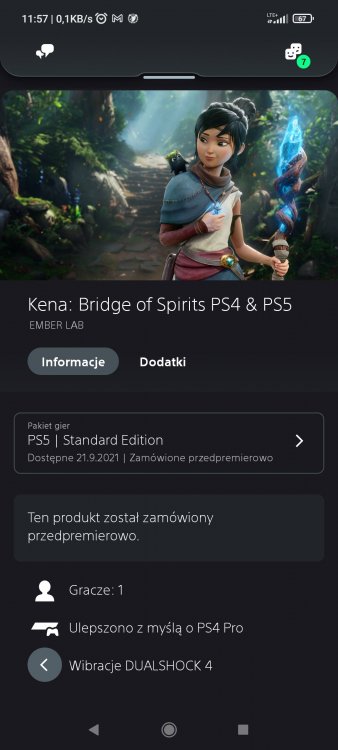
The new CFI-1100 series revision of PlayStation 5 is now making its way to market, bringing with it a wave of controversy. It began with the intriguing news that beyond revised WiFi and a new screw for the stand, the CFI-1100 model weighs 300g less than the original - an interesting puzzle that could only be solved by going hands-on. The first journalist to do that was Austin Evans, whose teardown and analysis answers a lot of questions, but raises others. Last night, I procured a unit myself, so I can add some initial insights based on my first few hours with the machine. Evans' video is well worth a watch because regardless of how you view his take on the machine's thermal performance, you get to see exactly how Sony has changed the design - and just as importantly, where it has not - and this is crucial information. Yes, WiFi does look different (the extent to which performance changes isn't tested) but the 300g weight loss seemingly comes down mostly to a new cooler design. There's no ifs and buts about it - this is clearly and obviously a cost reduction exercise, coming at a time where the platform holder can expect to shift millions of consoles as the holiday season kicks in at full force. The monstrous cooler of the original model - weighing in at 1639g - is replaced with a 1368g alternative, so essentially 277g of the 300g weight reduction is accounted for with the smaller cooler. The heat sink has fewer heat pipes (four vs six) and is built with an overall reduction in the copper content - aluminium only has 60 percent of the thermal conductivity of copper. There is another interesting change to the design: the fan has been replaced by another that has more blades, potentially capable of pushing more air out at the same speeds. But what's more interesting is the evidence surrounding what has not changed, based on Evans' data. Most crucially, the power draw of the machine looks very similar to the launch model PS5 in a world where cost reductions on cooling assemblies are usually rolled out only when the main processor is transferred over to a smaller, more efficient process technology. So, on the face of it, there are questions to be answered here and fundamentally it comes down to this: if the chip isn't any cooler and if the power requirements are the same, what has changed that justifies such a significant cutback in the mass and materials of the cooler? It's a perfectly reasonable question and I've asked Sony for comment. The crux of the controversy surrounding Evans' video stems from his view that the new PS5 is worse than the old one - it's his contention that a smaller cooler made from less efficient materials produces a hotter machine. It's not an outlandish theory by any means when you look at the mass and material reductions but the question of whether it's hotter or not cannot be determined by measuring the heat output of the exhaust alone and even if it does run a few degrees hotter, it may well still be within manufacturer's tolerances. In Evans' video, there was a very small reduction in noise from the new model, which seems at odds with the notion of a hotter machine. This may be explained in a number of ways - firstly, if the new machine is running hotter, that is absolutely fine according to its firmware and nothing to be worried about. After all, if there was an overheating problem, you would assume that the fan would speed up to better expel the heat. Secondly, the new fan may be doing a better job of pushing out the hot air and may simply be quieter than the original in the first place. It's a new part, after all. The final theory - which is perhaps somewhat less plausible - is that a smaller heatsink based on materials with a lower overall thermal conductivity has been redesigned in such a way to make it more efficient. There have been calls to test the internal thermal profile of the new PS5 in operation, especially after tests from Steve Burke at Gamers Nexus on the launch model revealed concerns on how one memory chip was running at very high temperatures, without much in the way of thermal dissipation. However, temperatures on the main processor and the voltage regulators looked fine. Ultimately though, if the central chip is running too hot, you'd expect the fan to spin up. That seemingly didn't happen on Austin Evans' unit and it's not happening on mine either. I've been running Remedy's Control for several hours now on my own CFI-1100 unit. In ray tracing mode, the game locks to 30fps and in standard gameplay, the PS5 draws around 170W from the wall. However, visiting the now infamous Corridor of Doom - a notoriously heavy area of the game well known to the DF audience - power utilisation increases to 200W. Entering photo mode removes the 30fps frame-rate cap, adding further to the power draw, peaking at 214W. This is pretty much the same max power draw as my launch PS5, strongly suggesting that the main processor has not been changed, but crucially, the acoustics of the new console have not adjusted at all to any noticeable degree in the hours that the scene has been running the processor flat out. Whether the machine is hotter or not is still to be tested, but logic suggests that if the new cooling assembly was not up to the task, the fan would be increasing in speed and volume to expel the build-up of heat. This does not seem to be happening - and hours on, the power draw is still consistent too. So if PlayStation 5 can work just fine with a cheaper, leaner cooler, why not just ship with it in the first place at launch? Without word from Sony, we can't say for sure but in terms of the production process, it's important to realise that when a console first comes to market, the separate components of the machine are created at the same time - in parallel, not in series. As the silicon rolls off the production line, the heat sinks are also being made. Nobody wants another red ring or yellow light of death, so it makes sense to build redundancy into the design. There is a documented example of this in Microsoft's original Xbox One - the hardware architects saw that there was headroom in their thermal solution so increased the core clocks on the processor itself. The GPU went from 800MHz to 854MHz, while the CPU enjoyed a bump to 1.75GHz from the original 1.6GHz. Would it have made the machine hotter? Probably. Did it matter? Clearly not. Perhaps with the benefit of more exposure to production silicon and all of the telemetry from the millions of units out there, Sony is confident enough to shrink the cooler and bring down the build cost of the machine. There are a few theories circulating about the potential for overheating that I think bear addressing. PlayStation 5 operates to a set power limit, with CPU and GPU core clocks moving up and down according to their power requirements - as divulged in Mark Cerny's Road to PlayStation 5 talk last year. There's concern that a hotter PlayStation 5 would see the machine unable to hit the boost clocks attainable in a notionally cooler launch model. Yes, performance on the new model should be tested, but I find it extremely unlikely that the new PS5 will perform any differently even if it were hotter than the old one. The clocks adjust according to an algorithm based on a single 'model' processor. Sony profiled how that single chip works under a multitude of different workloads and applied that algorithm to every PlayStation 5 in production, to ensure that even though clocks change, they will do so identically on every system out there. In short, boost isn't controlled by the temperatures of any given PlayStation 5, so the system should perform identically to any other. According to sources, new arrivals at retail are currently a mixture of CFI-1000 and CFI-1100 machines. While the chances of being able to choose which one you get are vanishingly small unless you go down the scalper route, there's a potential window of opportunity here to get an original machine or a new one. Right now, the new machine seems to be much the same as the old one in terms of the experience of actually using it and Sony certainly has the confidence to back the new design - we can assume that CFI-1000 is on the way out and of the millions of PlayStation 5s sold in the run-up to Christmas and beyond, they'll all be based on the new design. We will be spending more time with the new machine and will produce a full review in due course. https://www.eurogamer.net/articles/digitalfoundry-2021-hands-on-with-the-new-playstation-5-cfi-1100-series-consoleDlaczego piszesz dodatek na pełnoprawną grę lepszą od U44chan nie 4chan o tym mówiło się od dawna, m.in po to przejęli Nixxes. W łatkę z 60FPS dla U4 na PS5 nie wierzę, chyba że cała kolekcja dostanie uptade pod PS5, bo kolekcja z PS4 nie dostała wsparcia na prosiaka, a przydałaby się wyższa rozdziałka niż 1080p.VPNy, dla zagraniczniaków mają tylko pakiet 1 ligi za 30zł XD50zł za taką ofertę, niby można oglądać na trzech urządzeniach na razhttps://status.playstation.com/pl-PL/ Coś się dzieje z PSN, mi po 20 wyskoczył komunikat o konserwacji siecihttps://www.twitch.tv/motivestudioSquare sie nie pierdoli w tańcu z wycenąLawirują bo chuj wie jakie jeszcze umowy wydawnicze mieli podpisane przed przejęciem. Wiadomo o Deathloop i Gostwire Tokio. Wolf 3 jest na horyzoncie i ciekawe czy to jeszcze nie będzie multiplatforma, jeśli tak to pewnie nie będzie wersji natywnej dla PS5 jak w przypadku Psychonauts 2. Mogą też negocjować po cichu ich zmianę przed zapowiedzią, tylko tu pewnie wchodzą tantiemy i ich ilość potrzebna do renegocjacji ewentualnie coś w zamian.A co tam takiego tragicznego w tym Terminatorze? Bo ja chyba mogę wymienić tylko mały budżet i niedoświadczone studio, bo fabuła świetnie się wpisuje w uniwersum, gameplay jest sztywny ale nie wkurwia. Predator nie jest lepszy od Terminatora i nie wiem czy wiesz ale jest to gra online bez balansu z niewiele lepsza grafiką niż wspomniany Terminator.@suteq Doładowanie na enebce 100zł za 80.90 preorder 169zł, kupujesz dwa doładowania za 162zł i masz Kenę na PS4 i PS5, zostaje jeszcze 31zł do przejebania na jakiejś promce. https://lowcygier.pl/keyshopy/wyprzedaz-w-eneba-14-rabatu-na-caly-asortyment-sklepu-tylko-dla-lowcow-gier-31-08/Koleś który podał bezbłędnie lipcowego plusa przed zapowiedzią przez sony, zapodał że we wrześniu dostaniemy taki zestaw Overcooked tylko na PS5 Dzisiaj potwierdzenie od Sony powinno być O październiku się mówi że może wlecieć to, bo data premiery zgadzałaby się z momentem aktualizacji plusa, no i w PSS nie da rady zrobić preordera jest tylko zapowiedź.Tanie kody na enebie wleciały, jak zawsze na koniec miecha to trzeba było zrobić preorder
 Bardziej chodzi o bezbeczność i pieniactwo pana z przetłuszczonymi włosami i ego wyjebującym poza skalę. Co do insajderstwa nie mam z nim problemów.


Account
Navigation
Szukaj
Configure browser push notifications
Chrome (Android)
- Tap the lock icon next to the address bar.
- Tap Permissions → Notifications.
- Adjust your preference.
Chrome (Desktop)
- Click the padlock icon in the address bar.
- Select Site settings.
- Find Notifications and adjust your preference.
Safari (iOS 16.4+)
- Ensure the site is installed via Add to Home Screen.
- Open Settings App → Notifications.
- Find your app name and adjust your preference.
Safari (macOS)
- Go to Safari → Preferences.
- Click the Websites tab.
- Select Notifications in the sidebar.
- Find this website and adjust your preference.
Edge (Android)
- Tap the lock icon next to the address bar.
- Tap Permissions.
- Find Notifications and adjust your preference.
Edge (Desktop)
- Click the padlock icon in the address bar.
- Click Permissions for this site.
- Find Notifications and adjust your preference.
Firefox (Android)
- Go to Settings → Site permissions.
- Tap Notifications.
- Find this site in the list and adjust your preference.
Firefox (Desktop)
- Open Firefox Settings.
- Search for Notifications.
- Find this site in the list and adjust your preference.