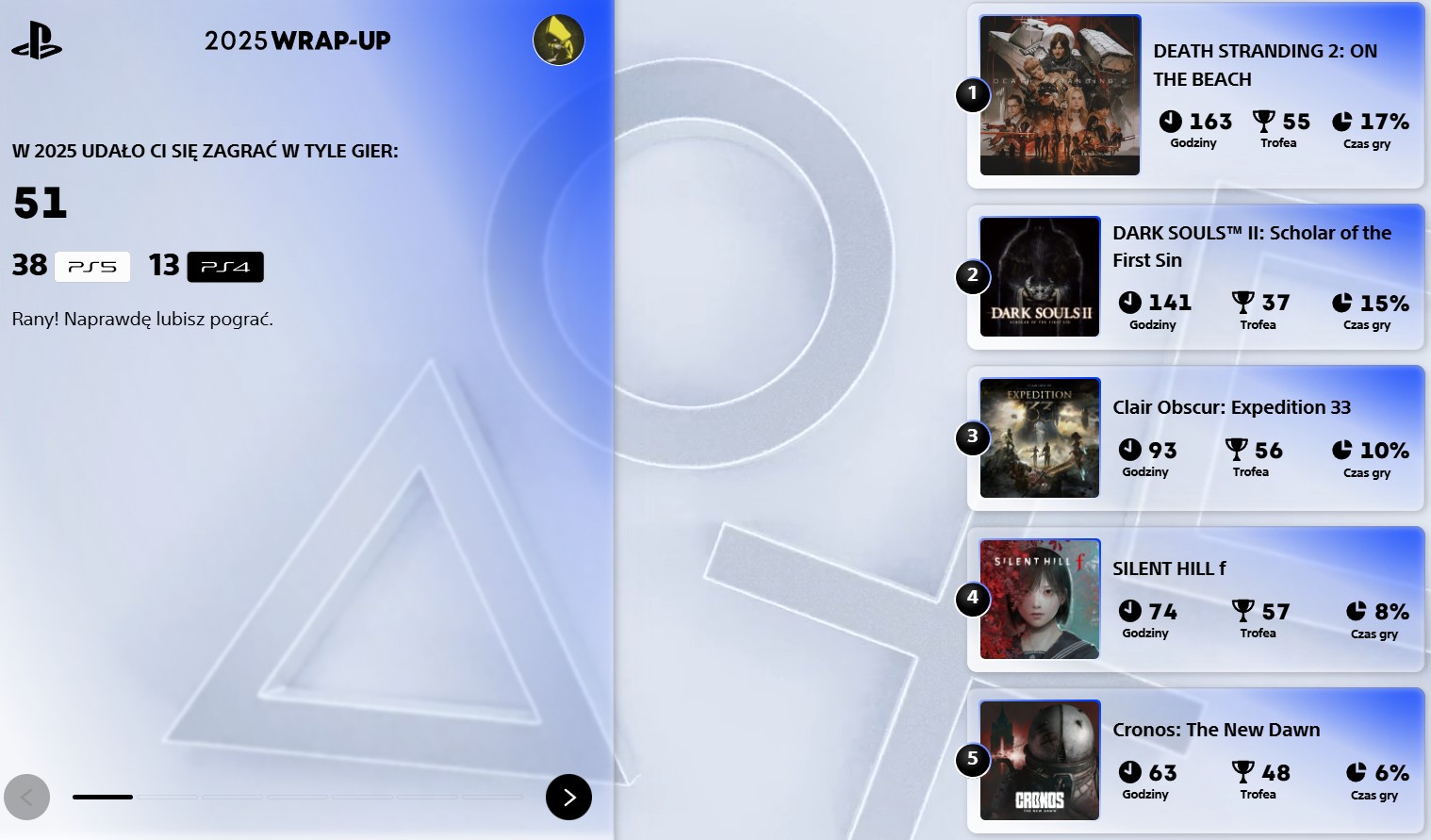
MEVEK 9 grudnia 20259 gru Moje podsumowanie 2025r A jak u Was ? MEVEK 9 grudnia 20259 gru i nawet wiedzą na czym grałem messer33 9 grudnia 20259 gru dawaj do tematu ziomeczku Rudiok 9 grudnia 20259 gru Alpha Trion 10 grudnia 202510 gru wykryli grubasa i kazali mi upgrade zrobić do pro :( KrYcHu_89 10 grudnia 202510 gru Trzeba zrobić taki sam wątek na Steam w tym roku, bo na główny mało kto wchodzi, a dużo PCtowców ostatnio :D.
KrYcHu_89 10 grudnia 202510 gru Trzeba zrobić taki sam wątek na Steam w tym roku, bo na główny mało kto wchodzi, a dużo PCtowców ostatnio :D.












MEVEK
i nawet wiedzą na czym grałem
messer33
dawaj do tematu ziomeczku
Rudiok
Alpha Trion
wykryli grubasa i kazali mi upgrade zrobić do pro :(
KrYcHu_89
Trzeba zrobić taki sam wątek na Steam w tym roku, bo na główny mało kto wchodzi, a dużo PCtowców ostatnio :D.