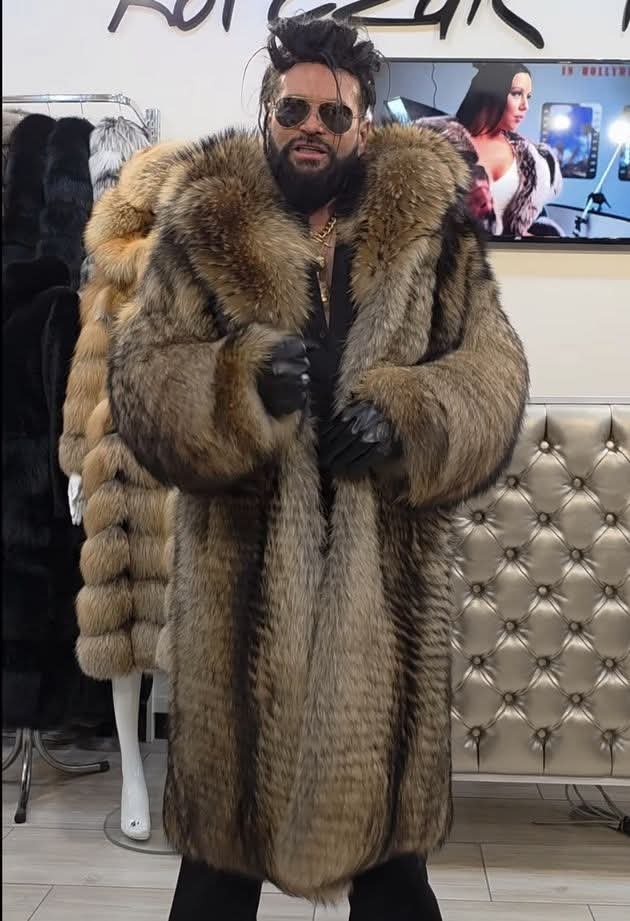
[InSaNe] 20 października 202520 paź Outfit na grobbing wybrany. A Wy co, dalej krótkie portaszki? Josh 20 października 202520 paź Widzę, że DLC z nowymi postaciami do Tekkena wymknęło się spod kontroli Colin 20 października 202520 paź kiedy klikniesz "random" w generatorze postaci. Plugawy 20 października 202520 paź Cyberpunk 2137 SebaSan1981 20 października 202520 paź Ludzie się strasznie zesrali o te skóry z tegoż outfitu. Czoperrr 21 października 202521 paź myślałem, że to the weeknd albo inny murzyn Agent_Man 21 października 202521 paź Jaki kraj, taki P.I.M.P. kanabis 21 października 202521 paź Haha jakbym swoja babcie widzial na 1 listopada w latach 90 Teraz to na chuj takie palto jak bedzie 15 stopni. Pix 21 października 202521 paź fajna loszka w tle ;d teddy 21 października 202521 paź Niezle sie stanowskiemu odkleilo Plugawy 21 października 202521 paź To po dostaniu koncesji na telewizję xD Sven Froost 21 października 202521 paź Rutkowski wyglada fatalnie
Josh 20 października 202520 paź Widzę, że DLC z nowymi postaciami do Tekkena wymknęło się spod kontroli
kanabis 21 października 202521 paź Haha jakbym swoja babcie widzial na 1 listopada w latach 90 Teraz to na chuj takie palto jak bedzie 15 stopni.







![[InSaNe]](https://www.psxextreme.info/uploads/profile/photo-thumb-2818.jpg)


Josh
Widzę, że DLC z nowymi postaciami do Tekkena wymknęło się spod kontroli
Colin
kiedy klikniesz "random" w generatorze postaci.
Plugawy
Cyberpunk 2137
SebaSan1981
Ludzie się strasznie zesrali o te skóry z tegoż outfitu.
Czoperrr
myślałem, że to the weeknd albo inny murzyn
Agent_Man
Jaki kraj, taki P.I.M.P.
kanabis
Haha jakbym swoja babcie widzial na 1 listopada w latach 90
Teraz to na chuj takie palto jak bedzie 15 stopni.
Pix
fajna loszka w tle ;d
teddy
Niezle sie stanowskiemu odkleilo
Plugawy
To po dostaniu koncesji na telewizję xD
Sven Froost
Rutkowski wyglada fatalnie