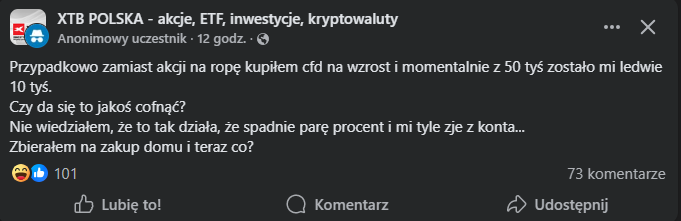
Czokosz Odpowiedziano 2 godziny temu2 godz. Author stats Na steamie możesz zaznaczyć opcję przypadkowy zakup i następnego dnia pieniądze są z powrotem na koncie. Tu też tak powinno być. Jesteśmy tylko ludżmi, każdy może się pomylić.
Sebas Odpowiedziano 2 godziny temu2 godz. Author stats Przypadkowo ale jakby siadło to pewnie by się poczuł jak wytrawny inwestor
KrYcHu_89 Odpowiedziano 39 minut temu39 min Author stats @Czoperrr gdzie lista gier, czy już się odkułeś jednak :)?










Mejm
Odpowiedziano
Czoper to ty?
Czokosz
Odpowiedziano
Na steamie możesz zaznaczyć opcję przypadkowy zakup i następnego dnia pieniądze są z powrotem na koncie. Tu też tak powinno być. Jesteśmy tylko ludżmi, każdy może się pomylić.
Sebas
Odpowiedziano
Przypadkowo ale jakby siadło to pewnie by się poczuł jak wytrawny inwestor
KrYcHu_89
Odpowiedziano
@Czoperrr gdzie lista gier, czy już się odkułeś jednak :)?