







Shago
Senior Member
-
Dołączył
-
Ostatnia wizyta
Treść opublikowana przez Shago
-
To 2.2 kw wynika z tego, że to kompromis przed nadmiernym przegrzaniem podczas długotrwałego ładowania: ludziom się często gniazdka topiły, wybijało korki itp jak leciało "na pełnej" czyli ponad 3kw
-
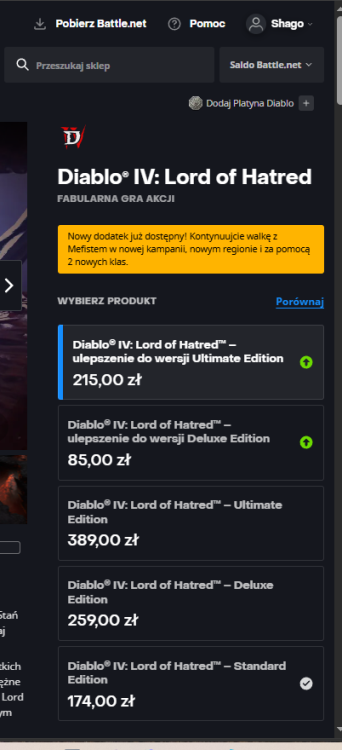
Co do Fiesty: miałem model z 2019 automat 100 koni i byłem mega zadowolony, bardzo polecam Jak nie duże auto zwróciłbym jeszcze uwagę na Suzuki Baleno. 4 cylindrowy silnik, w środku całkiem fajnie wygląda + ma naprawdę duży bagażnik jak na auto w tej klasie.Wykombinowali o to:Jaranko że spiderman zaliczył lepsze wpływy niż Endgame totalnie ignorując inflancję to jedno wielkie Endgame to był szczyt Marvela, po tym tylko Dr. Strange trzymał poziom za sprawą wspaniałego Cumberbatcha i cudownej Elizabeth Olson, reszta to mniejsze bądź większe gówno (jak z Galactusa można było zrobić taką miernotę to ja nie wiem)...Kiedyś tak kupiłem Crasha: 3 części na jednej płycie i płatność x3.Czuję, że moje Red Dead Redemption na płytce na X360 za kilkanaście lat będzie warte fortunęAleż będzie nawijane do samochodu w trakcie jazdy xDU mnie chyba "Czas Ultrona" będzie na pierwszym.Powiem więcej: wygląda jak goowno . Pewnie tego nie zrobią i nie zmienią daty premiery, ale stawać z czymś takim do walki z mocarną na zwiastunach Diuną toMiałem te druciki w Fieście, szybko się człowiek przyzwyczaił. Problem był inny: przez 5 lat jak miałem samochód użyłem tego może... ze 3-4 razy?Drugi sezon zakończył się mocnym cliffhangerem w tej kwestii.Resident Evil 9, Crimson Desert, Subnautica 2, Forza Horizon 6, Gears of War: E-Day, GTA VI, Onimusha, Hades 2, Pragmata, 007, Ace Combat 8... Czy 2026 to nie jeden z najlepszych roków w historii pod względem gamingu?Wracam do Diablo 4, wczoraj wjechał Lord of Hatred:
 Mieszkam w bloku, bardzo sobie chwalę lokalizację i w ogóle. Do tego za chwilę mi się urodzi pierwsze dziecko i jestem szczęśliwy, bo dziecko będzie miało się z kim tutaj bawić: osiedle jest "młode" i dzieci dużo biega między blokami, dom by mi tego nie dał. Nie mniej wyobrażam sobie dom szkieletowy, parterowy taki maksymalnie 100m2 zbudowany wg nowych rozwiązań.






Account
Navigation
Szukaj
Configure browser push notifications
Chrome (Android)
- Tap the lock icon next to the address bar.
- Tap Permissions → Notifications.
- Adjust your preference.
Chrome (Desktop)
- Click the padlock icon in the address bar.
- Select Site settings.
- Find Notifications and adjust your preference.
Safari (iOS 16.4+)
- Ensure the site is installed via Add to Home Screen.
- Open Settings App → Notifications.
- Find your app name and adjust your preference.
Safari (macOS)
- Go to Safari → Preferences.
- Click the Websites tab.
- Select Notifications in the sidebar.
- Find this website and adjust your preference.
Edge (Android)
- Tap the lock icon next to the address bar.
- Tap Permissions.
- Find Notifications and adjust your preference.
Edge (Desktop)
- Click the padlock icon in the address bar.
- Click Permissions for this site.
- Find Notifications and adjust your preference.
Firefox (Android)
- Go to Settings → Site permissions.
- Tap Notifications.
- Find this site in the list and adjust your preference.
Firefox (Desktop)
- Open Firefox Settings.
- Search for Notifications.
- Find this site in the list and adjust your preference.