Figuś
Senior Member
-
Dołączył
Treść opublikowana przez Figuś
-
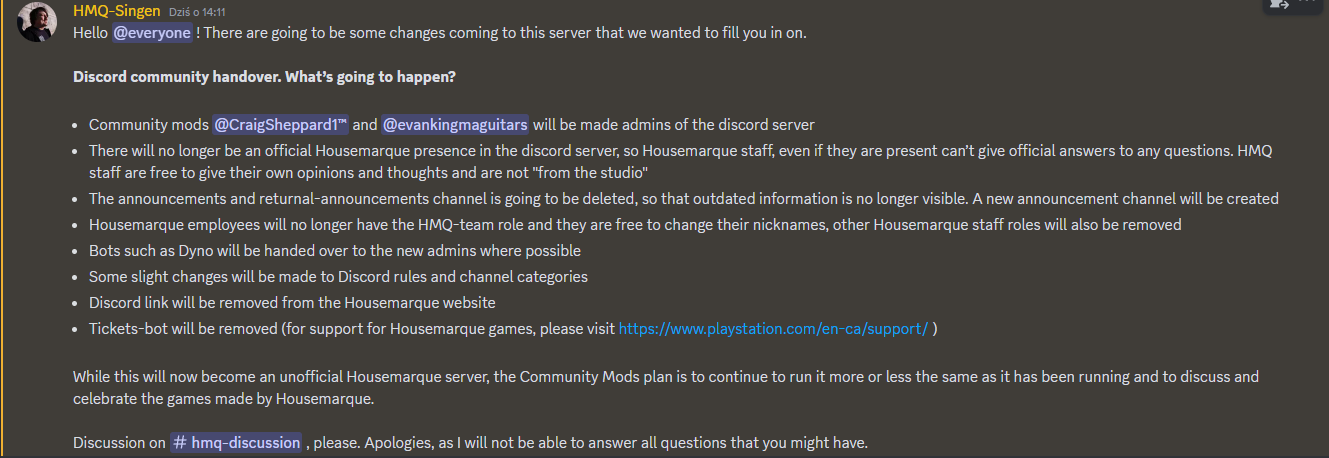
to jest to co było dla patronów tylko dostępne
-
wy tu o pro a Henderson już griluje kolejną generację
-
na konsolach jest pełna cena, na pc podstawowa wersja kosztuje 209złhttps://www.x-kom.pl/p/1280159-konsola-playstation-sony-playstation-5-pro.html?sm=lowcygier https://www.euro.com.pl/konsole-playstation-5/sony-playstation-5-pro-ps5-2tb.bhtmluważałbym na te oferty w okolicach 1k żeby sie nie naciąć na olxowy scamtak, ta podstawowa wersja na premierę też była spokoplus, obstawiam że będą pewnie bundle z napędem robione przez sony a nie sklepy ogólnie drama w chuj jak sięgam pamięcią wielu tutaj pisało w poprzedniej generacji że chętnie by wybecelowało sporo więcej za mocniejszą konsolę, a teraz płacz który w sumie jest powtórką z rozrywki sprzed 8 lat jak ogłaszali ps4prozrobi, ale to raczej będzie jak wczesne dlss od nvidii(bo też się rozbija o rozwiązanie sprzętowe) bo jest to jego pierwsza wersja, więcej bym oczekiwał przy następnej generacji jeżeli będą to rozwijać i nie porzucą tego jak ich rozwiązania z checkboardingiem z PS4Prozapomnijmoże się do jakiejś zapowiedzi szykują
 szkoda że nie na dynamiczne jak na ps4 i ps3Horizon to pewnie dostanie wersje goty dlatego usuwają XDzapomnij, i tak będą minimum rok w plecy bo MS wcześniej wyskoczy z nextgenem, 2028 najpóźniej PS6 digital z napędem osobno do kupienia
Account
Navigation
Szukaj
Configure browser push notifications
Chrome (Android)
- Tap the lock icon next to the address bar.
- Tap Permissions → Notifications.
- Adjust your preference.
Chrome (Desktop)
- Click the padlock icon in the address bar.
- Select Site settings.
- Find Notifications and adjust your preference.
Safari (iOS 16.4+)
- Ensure the site is installed via Add to Home Screen.
- Open Settings App → Notifications.
- Find your app name and adjust your preference.
Safari (macOS)
- Go to Safari → Preferences.
- Click the Websites tab.
- Select Notifications in the sidebar.
- Find this website and adjust your preference.
Edge (Android)
- Tap the lock icon next to the address bar.
- Tap Permissions.
- Find Notifications and adjust your preference.
Edge (Desktop)
- Click the padlock icon in the address bar.
- Click Permissions for this site.
- Find Notifications and adjust your preference.
Firefox (Android)
- Go to Settings → Site permissions.
- Tap Notifications.
- Find this site in the list and adjust your preference.
Firefox (Desktop)
- Open Firefox Settings.
- Search for Notifications.
- Find this site in the list and adjust your preference.