








Figuś
Senior Member
-
Dołączył
Treść opublikowana przez Figuś
-
Ten akurat to agent i akwizytor xboxa no ale nieśmiało ale zaczynają coś robić w tym kieunku
-
Zayebali w raichu z Saturna pewnie, a tak po prawdzie to M$ widzę coraz mocniej wysyła działa u nas na wzór Polskiego oddziału PS i robi eventy premierowe i fajne promki rozsyła.
-
No nie koniecznie, już kilka razy próbowałem wyjść ze "swojej strefy komfortu" i tylko potęgowało to niechęć do grania
-
Jak wyżej MBieniek pisze, dwa lata temu i rok temu zrobiłem sobie kilku miesięczne przerwy gdzie konsola jak już była odpalona to żeby coś na netflixie obejrzeć. Najlepszy okres do gierkowania u mnie przypada ostatnio w okresie od września do marca-kwietnia
-
-
Ale tak serio bez szydery to jest przykre
-
Właśnie dostałem na mail z amerykańskiego konta psn Rusza machina powoli
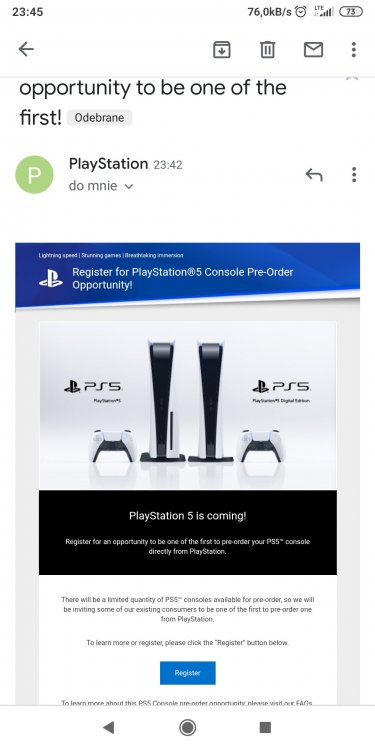
-
Legia w 10 XDTak, w momencie jak wydawca pisma się zmienił, gierkowy pudelek ppe.pl został pod starym wydawcąMafia Trylogia zawiera: • Mafia: Edycja ostateczna –zaprojektowany całkowicie na nowo klasyk, który dał początek tej kultowej serii. • Mafia II: Edycja ostateczna – uwielbiana przez fanów część serii, zremasterowana do rozdzielczości HD. • Mafia III: Edycja ostateczna - ponowne zetknięcie się z wielokrotnie nagradzanym, narracyjnym arcydziełem. Ja chyba wezmę trylogię, bo dwójeczkę też bym sobie przypomniałPyszne są te łzy w internetach, tak samo pyszne jak Krisztianu odchodził z RealuDostałem kod na 21pln od Phila z okazji gamescomu coś sie może kupi na wyprzedażyPewnie w dziale Nowego Xboxa? Nie martw się, w działach nowych konsol każdy nowy temat musi być zaakceptowany przez admina.No ja się poddałem wczoraj przy etapie ze ślizgiem na zgonie jakiegoś kolesia końcówka drugiego rozdziału. Nie mam ochoty już wracać do tytułu, jak była mordoklepka było spoko nawet bardzo spoko. Reszta to straszne mehh



Account
Navigation
Szukaj
Configure browser push notifications
Chrome (Android)
- Tap the lock icon next to the address bar.
- Tap Permissions → Notifications.
- Adjust your preference.
Chrome (Desktop)
- Click the padlock icon in the address bar.
- Select Site settings.
- Find Notifications and adjust your preference.
Safari (iOS 16.4+)
- Ensure the site is installed via Add to Home Screen.
- Open Settings App → Notifications.
- Find your app name and adjust your preference.
Safari (macOS)
- Go to Safari → Preferences.
- Click the Websites tab.
- Select Notifications in the sidebar.
- Find this website and adjust your preference.
Edge (Android)
- Tap the lock icon next to the address bar.
- Tap Permissions.
- Find Notifications and adjust your preference.
Edge (Desktop)
- Click the padlock icon in the address bar.
- Click Permissions for this site.
- Find Notifications and adjust your preference.
Firefox (Android)
- Go to Settings → Site permissions.
- Tap Notifications.
- Find this site in the list and adjust your preference.
Firefox (Desktop)
- Open Firefox Settings.
- Search for Notifications.
- Find this site in the list and adjust your preference.