Figuś
Senior Member
-
Dołączył
Treść opublikowana przez Figuś
-
zaraz skasują grę i zamkną studio pewnie XDw końcu, :)Ty kupiłeś i okej, nie wszyscy mają priorytety jak ty i jedna plastikowa zabawka im wystarczy pod TV, poza tym niektórzy mogą mieć mimo wszystko barierę psychologiczną przed wywaleniem ponad klocka czy tam dwóch na sprzęt po to żeby zagrać w jedną grę której nie ma na jego aktualnej plastikowej zabawce pod TV. I nie sugerowałbym się tylko ludźmi z forum czy innych sociali, to jest promil klientów.zacznijmy od tego że lechia nie powinna dostać licencji na przyszły sezonda radę żeby ta część strony była cały czas na górze strony jak się przegląda forum, na poprzednim silniku dało radę a tutaj albo nie ma albo nie widzę możliwości ustawienia tego
 Jak widać opłaca się wziąć sony na przetrzymanie, 11 kwietnia miał skończyć mi sie plus extra. Na początku marca przyszło mi powiadomienie na maila o tym i że mam automatyczne odnawianie włączone, tego samego dnia je wyłączyłem. Dzisiaj kupiłem zdrapki taniej chcąc przedłużyć plusa, jakież bylo moje zdziwienie jak chcąc to zrobić przez apkę wyskoczył mi rabat -25% i z 520zl zeszlo na 390 wspaniałych PLNów😎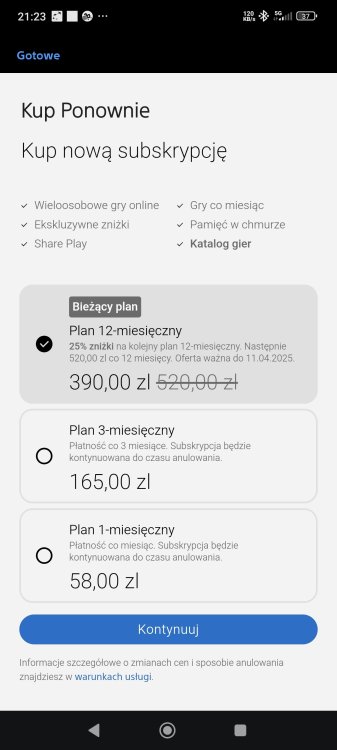
Account
Navigation
Szukaj
Configure browser push notifications
Chrome (Android)
- Tap the lock icon next to the address bar.
- Tap Permissions → Notifications.
- Adjust your preference.
Chrome (Desktop)
- Click the padlock icon in the address bar.
- Select Site settings.
- Find Notifications and adjust your preference.
Safari (iOS 16.4+)
- Ensure the site is installed via Add to Home Screen.
- Open Settings App → Notifications.
- Find your app name and adjust your preference.
Safari (macOS)
- Go to Safari → Preferences.
- Click the Websites tab.
- Select Notifications in the sidebar.
- Find this website and adjust your preference.
Edge (Android)
- Tap the lock icon next to the address bar.
- Tap Permissions.
- Find Notifications and adjust your preference.
Edge (Desktop)
- Click the padlock icon in the address bar.
- Click Permissions for this site.
- Find Notifications and adjust your preference.
Firefox (Android)
- Go to Settings → Site permissions.
- Tap Notifications.
- Find this site in the list and adjust your preference.
Firefox (Desktop)
- Open Firefox Settings.
- Search for Notifications.
- Find this site in the list and adjust your preference.