








Figuś
Senior Member
-
Dołączył
Treść opublikowana przez Figuś
-
hmm senior memberzy mogą edytować post bez oznaczenia go że był edytowany, trzeba by było zapytać administracji czy można edycje postów wyłączyć w tym temacie
-
Oczywiście że kupi, jak tylko deal z Sony się skończy, to w GPU właśnie będzie dodatkowo dostawał dużo wcześniejszy dostęp do choćby bety, jakieś dodatkowe korzyści i ekskluzywne duperele. Po 7 generacji Sony wiele kasy zainwestowało żeby to właśnie na sonce zrobić dom dla Coda, co im się udało bezapelacyjnie. Cały marketing był u Sony, ale po przyklepaniu dealu i końcu umowy to MS będzie bombardował pod swoim sztandarem marketingiem Coda. Cod dalej się będzie sprzedawał na Ps, ale zyski z tego sony będzie miało coraz mniejsze. Zapominasz też że Ms ma najtańszą konsolę na rynku próg wejścia to tylko 300$ a w hamburgerowni gdzie CoD się najlepiej sprzedaje to będzie potężny strzał w pysk Jimbo i jego japońskich zwierzchników. Europa i Azja w tym dealu nie mają takiego znaczenia ja Murcia.
-
od kilku tygodni ta sama rozkmina, domysły i teorie spiskowe Tu nie potrzeba rozkminy bo to jest główny powód skomlenia japończyków o którym tu już kilkukrotnie było wspominane przez Asaxa, Dona, Bigbiego i kilku innych W chuj ludzi grających wyłącznie w CoDa bez sentymentu spierdoli do konkurencji i tam będzie zostawiać jeszcze większe pieniążki za tęczowe skórki do broni bo zaoszczędzą na zakupie gry. Zaś sam zakup AB szybciutko się będzie zwracał z mobilnego Diablo czy Coda
-
Ludzie się sami zgłaszali w tym ludzie ze studia, po czym byli wysyłani na przyspieszone szkolenia jeżeli się nadawali. Serio warto odpuścić w tym przypadku. Skupmy się na jebaniu studiów które na to na prawdę zasługują na tą chwilę.
-
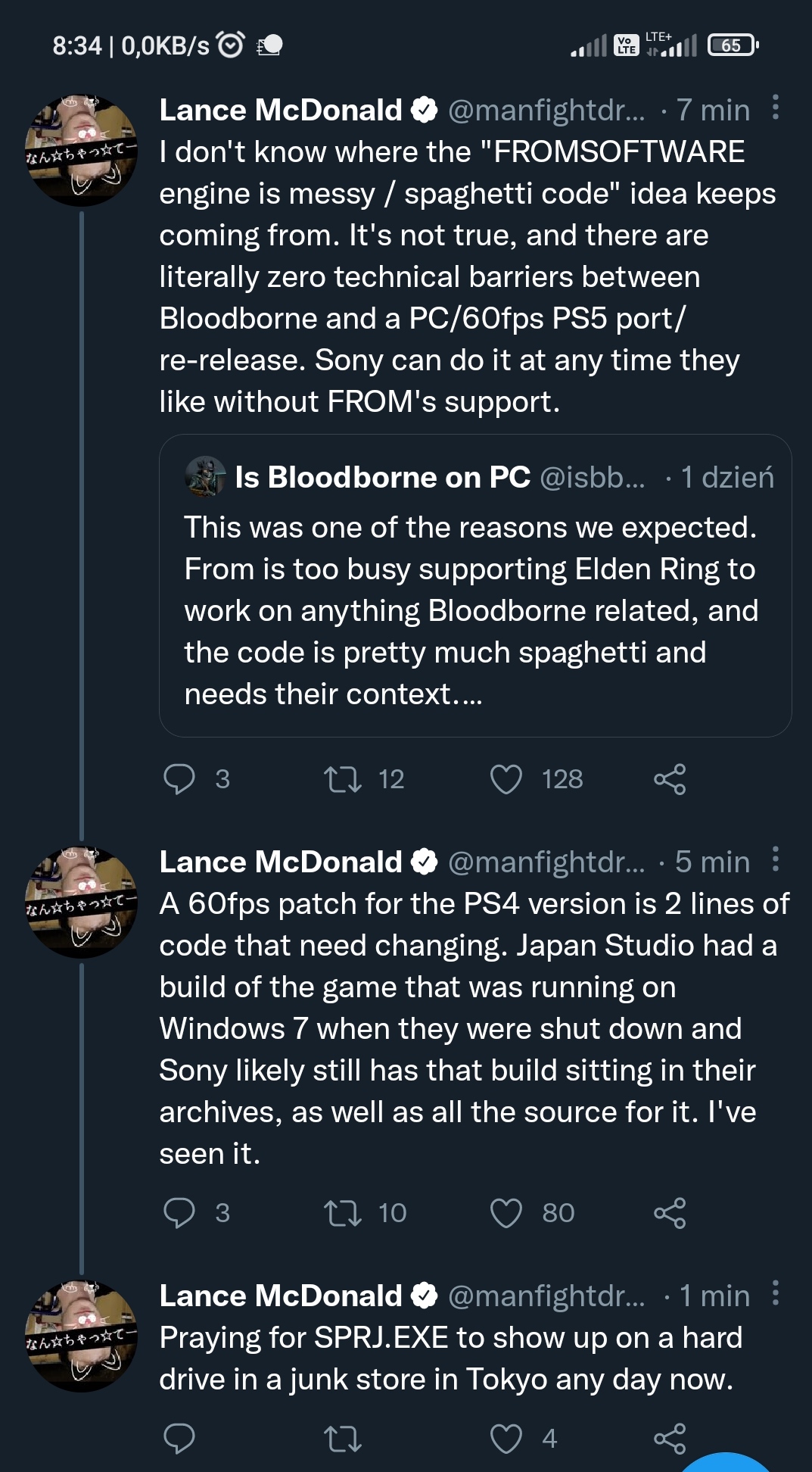
Rotacja jest duża bo pewnie nie każdy mógł lub chciał opuścić Ukrainę, nie porównywałbym tej akurat sytuacji z tym co się dzieje w innych studiach na świecie.też 3500 rocznie schodzi u mnie, no nic trzeba będzie zrezygnować z grzania wody prądem, w okresie wiosenno letnim i wczesną jesieniąto ja już wole nasze przeróbkiTak, a o co chodzi? XDJeszcze się dobrze marketing nie zaczął, do premiery jeszcze sporo czasu, ale chuj już wyrzucany na śmietnik historii XD Z osądem poczekałbym jeszcze chwilęPodratować by ich mogło w tym to pełne wsparcie na PC i cena niższa od Questa po podwyżkachciekawe jak szybko cena zleci do 150$ przy tej cenie brak łączności z mobilnym netem to headshot w kolano i to taki festcała niteczka tego jest pod tym tłitemZa miliony monetnie dla gier natywnych PS5, gier z ps4 możnaPierdoli się w bańce z cenami, niedługo w polecajkach "tani komputer do gier" będzie się zaczynał od poziomu 8k PLN209zł na premierę trzeba dać https://lowcygier.pl/preordery/assassins-creed-mirage-dlc-40-rozbojnikow-na-playstation-xbox-i-pc-od-199-zl-w-rtv-euro-agd/i jakieś piro show na biurku





Account
Navigation
Szukaj
Configure browser push notifications
Chrome (Android)
- Tap the lock icon next to the address bar.
- Tap Permissions → Notifications.
- Adjust your preference.
Chrome (Desktop)
- Click the padlock icon in the address bar.
- Select Site settings.
- Find Notifications and adjust your preference.
Safari (iOS 16.4+)
- Ensure the site is installed via Add to Home Screen.
- Open Settings App → Notifications.
- Find your app name and adjust your preference.
Safari (macOS)
- Go to Safari → Preferences.
- Click the Websites tab.
- Select Notifications in the sidebar.
- Find this website and adjust your preference.
Edge (Android)
- Tap the lock icon next to the address bar.
- Tap Permissions.
- Find Notifications and adjust your preference.
Edge (Desktop)
- Click the padlock icon in the address bar.
- Click Permissions for this site.
- Find Notifications and adjust your preference.
Firefox (Android)
- Go to Settings → Site permissions.
- Tap Notifications.
- Find this site in the list and adjust your preference.
Firefox (Desktop)
- Open Firefox Settings.
- Search for Notifications.
- Find this site in the list and adjust your preference.